Can a Fireproof Safe Protect Hard Drives and Photos?
Choose a fireproof safe for hard drives only after confirming protection for your exact media and its storage limits. A paper fire rating alone is not enough, and an off-site backup remains essential.
On this page (7 sections)
- Can a fireproof safe for hard drives protect digital media?
- Which storage options fit documents and digital backups?
- How should you choose the right size and protection?
- How should you set up and care for stored drives?
- Can fireproof safes protect printed photos?
- What backup mistakes should you avoid?
- Which fireproof safe for hard drives should you choose?
A fireproof safe for hard drives needs protection that matches your media, because a paper fire rating alone does not establish that a drive will survive. None of the 3 containers below has confirmed hard-drive protection in the details available here.
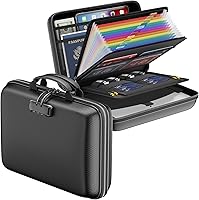
The SentrySafe SFW123DSB names USBs and DVDs among its protected contents, making it the closest match for those specific media. The HD4100 suits hanging files, while the DocSafe organizer suits portable sorting.
Choose around what you actually need to preserve: original prints, a disconnected backup drive, or documents. Keep another copy of important files away from the safe.
Can a fireproof safe for hard drives protect digital media?
A suitable safe can add protection for digital media, but its classification must cover the contents you store. The duration and outside temperature do not, by themselves, tell you whether conditions inside suit your drive.
Paper, photographic prints, optical discs, and electronic storage devices have different vulnerabilities. A container that preserves readable documents may still expose a drive to damaging heat or moisture.
See what a 1-hour fireproof safe rating means for help interpreting duration and exposure conditions. Our guide to fireproof and fire-resistant labels explains why neither term promises survival in every fire.
What does a fireproof safe rating tell you about hard drives?
A useful rating identifies the exposure conditions and contents covered. For an external hard drive, look for explicit coverage that applies to that device, along with limits you can compare against its manufacturer's storage guidance.
A USB connection does not make an external hard drive equivalent to a USB flash drive. Likewise, flash storage inside an SSD does not mean every protection claim for USB devices covers that SSD.
If the safe's documentation leaves this unclear, get confirmation for your media before buying. Choose a different model with documented coverage if protecting the drive is the main reason for the purchase.
Which storage options fit documents and digital backups?
Choose the SFW123DSB for its named USB and DVD coverage, the HD4100 for file organization, or the DocSafe for carrying sorted documents. These are different storage tools, and none should replace an off-site backup.
When does the SentrySafe HD4100 fit?
The SentrySafe HD4100 fits households organizing paper records alongside a separate digital backup system. Its hanging-file layout makes more sense for insurance papers and certificates than for someone buying primarily to protect hard drives.
SentrySafe describes the HD4100 as UL Classified for up to 30 minutes of fire exposure and ETL Verified for protection during water exposure. Those details support its document-storage role without establishing hard-drive protection.
Its 0.65 cubic foot interior measures 12 inches wide, 8.1 inches deep, and 11.5 inches high. Measure any rigid cases you plan to add, since hanging folders and bulky devices compete for usable space.
The key lock includes 2 keys, so keep the spare somewhere secure outside the box. At 38.8 pounds, it also needs a planned storage spot even though it can be relocated.
Skip it as your primary hard-drive fire safeguard unless you obtain coverage details for that media. Buy it when paper organization is the main job.
When does the SentrySafe SFW123DSB fit?
The SentrySafe SFW123DSB suits stationary storage of documents and the media SentrySafe specifically names. Among these options, it offers the clearest stated protection for USBs and DVDs.
SentrySafe describes it as UL Classified for 1 hour at 1700°F for documents, valuables, DVDs, and USBs. Its separate ETL water verification covers 24 hours in water up to 8 inches deep.
The 1.23 cubic foot interior measures 12.6 inches wide, 11.9 inches deep, and 13.8 inches high. A shelf helps divide papers from smaller items, while 4 live-locking bolts, a pry-resistant hinge bar, and bolt-down hardware support its security role.
At about 86 pounds, this is a safe to place deliberately rather than move for each backup. Plan delivery access and a suitable support surface before it arrives.
Skip it for frequent transport, and don't assume its USB wording covers your external hard drive. Read our SentrySafe SFW123DSB review if its stationary layout fits your needs.
When does the DocSafe 5200F Organizer fit?
The DocSafe 5200F Organizer suits people carrying documents and small devices between locations. Its compartments help with sorting, while the soft body keeps its role distinct from a rigid safe.
It measures 15 by 11 by 4.1 inches and weighs 16 ounces. Inside are 4 USB pockets, passport pockets, card slots, folder layers, and a main compartment, with a combination lock and carrying handle.
DocSafe describes an 8-layer shell and water-resistant construction. Its 5200°F material claim does not establish how cool a drive stays inside or provide a duration for protecting digital media.
Skip it as your sole fire safeguard for irreplaceable files or as a substitute for a rigid security safe. Choose it for organized transport, with a protective drive case and another backup elsewhere.
How should you choose the right size and protection?
Choose media coverage first, then usable space, water protection, and access. Extra capacity cannot solve a mismatch between the safe's protection and the contents.
Work through these checks before ordering:
- Identify the contents. Separate hard drives, SSDs, USB flash drives, discs, printed photos, and paper records.
- Compare storage limits. Use the device manufacturer's limits for disconnected storage rather than assuming all electronics tolerate the same conditions.
- Measure the packed items. Include protective cases, sleeves, and awkward shapes rather than comparing bare drives with total capacity.
- Check water conditions. Depth and duration matter, and a fire claim does not establish water protection.
- Plan routine access. A container you can open and repack easily makes backup rotation more practical.
Leave enough clearance to remove a drive without dragging it against other contents. Our guide to choosing a safe size explains how to plan usable space around your belongings.
How should you set up and care for stored drives?
Store drives powered off, disconnected, and protected from knocks. A closed safe is a storage space, not a place to run a drive or charge equipment.
Safely eject the device, disconnect its cable, and let it return to normal room temperature before putting it away. Keep cables separate if their plugs could press against the drive or strain its ports.
Use a case appropriate for the device, especially for a bare internal drive with exposed electronics. Keep heavy documents from bearing down on it, and avoid stacking loose drives against one another.
Choose a stable location away from routine dampness, and follow the container's placement and anchoring instructions. Don't drill extra holes or alter seals, since modifications can affect protection.
Check periodically for moisture, corrosion, damaged closures, or a strained zipper. Follow the manufacturer's moisture-control guidance, and never put damp papers or wet equipment inside.
After fire or flooding, wait until the area is declared safe before approaching the container. If a drive is wet or heat-damaged, get recovery advice before powering it on.
Can fireproof safes protect printed photos?
A fire-resistant container can add a layer of protection for prints, but preserving photos also requires suitable packaging and dry storage. Paper coverage alone does not confirm protection for every photographic material.
Keep prints flat in photo-safe sleeves or an archival box, without squeezing them beneath heavy items. Avoid loose rubber bands, adhesive tape on the image, and overfilled stacks that bend corners.
Negatives and slides need their own storage guidance, so don't assume advice for ordinary prints applies to them. Read whether fireproof safes are really fireproof for the limits of broad protection claims.
Should photos and drives go in plastic bags?
Use packaging made for the item, rather than relying on an ordinary bag as fire protection. A bag can trap moisture if the contents are damp, and it does not establish a safe interior temperature.
Check water protection separately from fire protection. Our guide to whether fireproof safes are waterproof explains the distinction.
What backup mistakes should you avoid?
Avoid keeping every copy within reach of the same disaster. A computer, a backup drive, and a safe in one room can all be affected by one event.
Use the 3-2-1 approach as a starting point: 3 copies, on 2 types of storage, with 1 copy off-site. A computer, a disconnected backup drive, and a secure online backup can fill those roles.
Check that you can open backed-up files and recover a folder, rather than trusting a completed copy message. Repeat this after changing backup software or replacing a drive.
Label drives with their backup dates and keep recovery passwords accessible through a separate secure method. Scan irreplaceable prints, and store those scans away from the originals.
For deciding which physical records belong beside your backups, see what to keep in a home safe.
Which fireproof safe for hard drives should you choose?
For a fireproof safe for hard drives, buy only after confirming protection for your exact media. If none of these containers provides that confirmation, look beyond this group rather than choosing by temperature claims alone.
Pick the SFW123DSB for stationary storage when its named media coverage fits, the HD4100 for hanging paper files, or the DocSafe for portable organization. Keep an off-site copy whichever container you choose.
For help planning the safe's broader role in your household, use our fireproof safe for home guide.
Frequently asked questions
Can a fireproof safe protect an external hard drive?
A safe can add protection, but its fire classification must cover the media you store. Paper protection alone does not establish suitable conditions for an external hard drive.
Compare the safe's protection details with the drive manufacturer's storage limits, and keep another copy away from your home.
Are photos safe in a fireproof safe?
A fire-resistant safe can add protection for printed photos, but a paper rating does not guarantee photo survival. Keep prints in photo-safe sleeves or an archival box, avoid damp storage, and scan irreplaceable images.
Store those digital copies separately so one fire or flood cannot destroy every version.
Can you put a hard drive in a fireproof document box?
You can store a disconnected drive in a document box if it fits without pressure, but physical fit does not establish fire protection. Check coverage for that media and follow its storage guidance.
Use a suitable protective case, keep the closure clear, and maintain a separate backup.
Should I store backup drives in the same safe as my computer?
Keep at least one backup away from the computer and its likely hazards. A safe at home can hold a local copy, but fire, flooding, or theft could affect both.
Use another location or a secure online backup, and regularly check that you can recover files.